
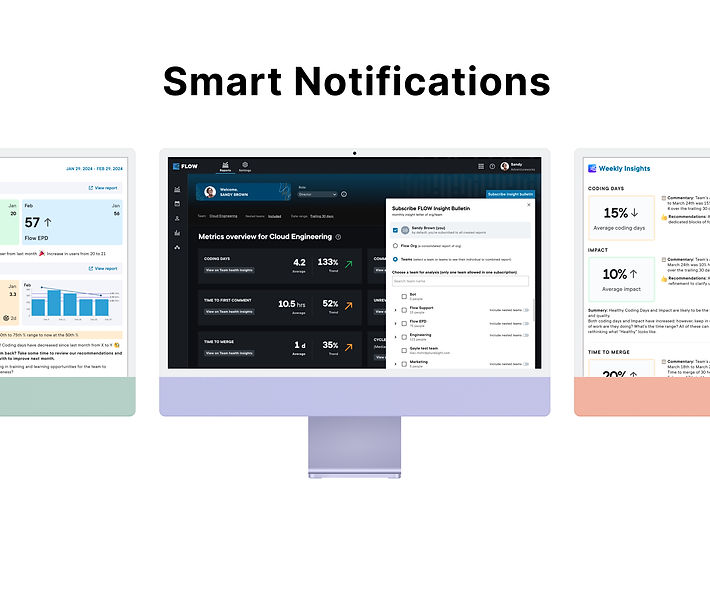
Notifications for FLOW
Notifications in our B2B product, "Flow," leverage data-driven insights and intelligent algorithms to deliver timely, personalized, and relevant alerts. These notifications help engineering teams stay updated on project statuses, reduce cycle times, enhance team performance, and boost confidence in delivery by providing actionable, context-aware information right when it's needed. Notifications can significantly improve user engagement and productivity by tailoring content to individual user needs and optimizing delivery times.
Company
Pluralsight, FLOW
Role
Senior Product Designer Individual Contributor (IC)
Year
2024 - Present
Collab
PM, Engineering Manager and Developers, Sales, 5+ Teams
The Problem
To retain existing customers and increase engagement, we identified several critical gaps within "Flow" that hinder user retention and productivity. Key customer problems include:
-
Lack of Automated Alerts: Users face challenges with manual data sorting and delayed responses due to the absence of automated alerts for significant commits or important events.
-
Accessible Team Assistance View: There is a need for an easily accessible view of team members requiring assistance and their task progress to support the team and ensure task completion effectively.
-
Team-Level Alerts: Users request alerts at the team level when metrics deviate from a healthy range, avoiding individual targeting while maintaining smooth operations and prompt issue resolution.
-
Navigation and Content Discovery: Difficulty in navigating and finding relevant content within the platform hampers effective engagement and goal achievement.
Objective
To address these customer problems, we initiated the development of notifications. This initiative aims to enhance user retention and engagement by delivering personalized, context-aware alerts. By providing timely and relevant information tailored to individual user needs, we aim to:
-
Increase User Retention: Ensure that existing customers remain engaged with "Flow" by providing continuous value through relevant notifications.
-
Boost User Engagement: Encourage users to spend more time on the platform by offering actionable insights and updates that keep them informed and involved.
-
Improve Productivity: Support engineering teams in staying updated on critical metrics and project statuses, enhancing their productivity and confidence in delivery.
-
Enhance User Experience: Deliver a seamless and intuitive notification system that adds value without being intrusive, ultimately improving the overall user experience.
By meeting these objectives, the notification initiative aims to create a compelling feedback loop that encourages users to return to "Flow" frequently, solidifying it as an essential tool for their daily operations and long-term success.
Strategy
Our notifications initiative aims to overhaul the existing system, addressing feedback about information accessibility and report creation complexity. The goal is to boost user retention and engagement through timely, actionable notifications. We're executing this plan in phases:
1. Initial Development and MVP
We began with the Minimum Viable Product (MVP), targeting VPs and Directors with monthly email reports and weekly notifications. This phase involved brainstorming, customer interviews, and parallel backend architecture development.
2. Testing and Iteration
We're conducting thorough testing in three phases—Internal UAT, Alpha Testing within Pluralsight, and Beta Testing with selected customers—to refine and validate the system before General Availability (GA).
3. Post-H1 Development
Post-H1, we're rolling out a new system based on user feedback, focusing on improved navigation and simplified processes for creating reports and Slack rules.
Approach to solution and Process
We implemented a strategic approach that involved thorough research, collaborative brainstorming, and cross-functional teamwork. Our structured process ensured that the solution was well-grounded and aligned with user needs.
1. Collaborative Brainstorming
We began with brainstorming sessions involving various teams to generate ideas on desired notifications and preferred delivery channels. This step provided valuable initial insights and helped shape our approach.
2. Comprehensive Secondary Research
Next, I did secondary research to gather and summarize existing knowledge about smart notifications. This involved reviewing literature, case studies, and industry best practices, identifying common problems and successful strategies. This research informed our focus on the Minimum Viable Product (MVP).
3. Persona-Centric Focus
Based on the research findings, we defined our target personas—Vice Presidents (VPs) and Directors—who are crucial for user retention. We decided to develop monthly email reports and weekly email notifications tailored to their needs for the MVP.
4. Customer Interviews Planning
Recognizing the importance of direct feedback, we planned a series of interviews with select customers to validate our assumptions and gather detailed insights into user needs and preferences.
5. Cross-Functional Collaboration
Given the complexity of the project, we engaged in extensive cross-functional collaboration. We connected with all customer-facing teams to gain deeper insights into the basic needs of our target personas. Their input was invaluable in refining our approach.
6. Engineering Development
While the product team focused on research and discovery, the engineering team worked on developing the backend architecture necessary to support the smart notifications. This parallel effort ensured technical development kept pace with research insights.
7. Utilizing Internal Insights
Due to the time required for customer recruitment, we initially utilized insights from internal teams. These meetings provided a preliminary understanding of target personas' needs and helped us identify key metrics for success.
8. Customer Validation and Iteration
We conducted customer interviews to validate our hypotheses and gather feedback on our proposed solution. The insights confirmed that our approach was on the right track and highlighted areas for further refinement. Based on this feedback, we iterated on our solution, refining the notification content, delivery methods, and overall strategy.
Following this strategic approach and structured process allowed us to develop a well-grounded smart notification system tailored to the needs of VPs and Directors. This methodical approach ensured that our solution was effective in driving user retention and engagement within "Flow."

Designing notifications
As part of our initiative to enhance user retention and engagement within "Flow," I designed a comprehensive smart notification system. This system includes three key experiences: subscribing to a monthly report, receiving weekly notifications, and managing subscriptions. Additionally, I ensured seamless integration with the current messaging system to provide a cohesive user experience.
1. Subscription for Monthly Report
To streamline the process of subscribing to monthly reports, I designed a user-friendly interface where users can easily opt in. Key features include:
-
Subscription Page: A dedicated page where users can select and customize their monthly report preferences.
-
Intuitive Flow: Step-by-step guidance to help users understand what information they will receive and how it benefits them.
-
Confirmation and Reminders: Automated confirmation messages and reminders to keep users informed about their subscription status.
2. Receiving Monthly Reports
The design for receiving monthly reports focused on clarity and accessibility:
-
Email Design: Clean and professional email templates that present the most important metrics and insights.
-
Summary and Detail: A summary at the top of the email with key highlights, followed by detailed sections for deeper insights.
-
Actionable Insights: Clear calls-to-action and links to additional resources, encouraging users to engage with the content.
3. Weekly Notifications
Weekly notifications were designed to keep users informed and engaged with timely updates:
-
Notification Settings: A settings page where users can customize the frequency and type of notifications they receive.
-
Concise Messages: Short, concise notifications delivered via email and integrated messaging platforms, highlighting critical updates and actions required.
-
Engagement Links: Direct links in notifications to relevant sections within "Flow," making it easy for users to act on the information provided.
4. Managing Subscriptions and Unsubscribing
To ensure users have full control over their notifications, I designed intuitive subscription management features:
-
Edit Subscriptions: An easy-to-navigate interface where users can modify their subscription preferences, such as changing the frequency or type of reports.
-
Unsubscribe Option: A straightforward process for users to unsubscribe from reports or notifications, with clear confirmation messages to prevent accidental unsubscriptions.
-
User Feedback: Confirmation emails and on-screen messages reassure users that their preferences have been updated successfully.
5. Integration with Current Messaging System
To maintain consistency and avoid user confusion, I ensured the new smart notification system integrates seamlessly with the existing messaging system:
-
Unified Interface: Consistent design elements and user interface components to provide a cohesive experience across all messaging and notification platforms.
-
Clear Communication: Transparent communication about the new features and how they complement the existing system, helping users transition smoothly.
-
User Education: In-app guides and support resources to help users understand and utilize the new notification features effectively.
By designing these experiences with a user-centric approach, I aimed to create a smart notification system that enhances user engagement and aligns seamlessly with the existing "Flow" environment. The focus on clear, actionable, and customizable notifications ensures that users receive the information they need in a manner that is convenient and beneficial to them.
Check out the final designs here


Collaboration
In the project, while collaboration with over five teams was essential, my primary focus was working closely with the PM. Together, we held numerous intensive working sessions to document all scenarios, covering every permutation and combination of metrics—whether increasing, decreasing, stable, or aligning with industry benchmarks—and their implications for trends. We also conducted multiple rounds of reviews with stakeholders and the content team to ensure comprehensive analysis and alignment.
Take a look at all scenarios.
What we expect
In this project, we aim to solve the problem of creating an engagement loop for our users. Our target personas are busy individuals who prefer concise and relevant information. To address their needs, we designed a reporting system that provides key insights into their teams' usage of Flow. Initially, the system highlights whether their teams are actively using Flow. If so, it further details their achievements and any areas requiring immediate attention. Users can click on specific reports to access Flow for a more detailed view of other metrics.
Our intent is not to use this information as a tool for pressure, but to foster a healthy work culture within teams and upper management. By delivering valuable insights, we aim to increase the likelihood of repurchasing Flow, thereby retaining our customers.